Go compiles to a single binary with no runtime dependencies. No virtualenv to activate, no nvm shims, no interpreter version drift between environments. That changes the scheduling story compared to Python or Node.js, but the fundamentals stay the same: system crontab for standalone scripts, in-process libraries for long-lived services, container-native approaches for Docker and Kubernetes. This guide covers all of them. Each solves a different problem. And each has a way to fail silently that you won't catch without monitoring.
System crontab with a Go binary#
A compiled Go program is the simplest thing crontab can run. One binary, no dependencies, no PATH issues. Build it, copy it to the server, add one line. If cron expression syntax needs a refresher, that linked guide covers the five fields in detail.
A cleanup script that removes expired sessions from Postgres:
0 3 * * * /opt/app/bin/cleanup-sessions >> /var/log/cleanup.log 2>&1No interpreter path to specify. No virtual environment to activate. The binary at /opt/app/bin/cleanup-sessions includes everything it needs. That's it. Go's single-binary model is a genuine advantage here over interpreted languages.
The environment variable gap
Cron still strips your shell environment. If your Go program reads os.Getenv("DATABASE_URL"), that variable won't exist in cron's context. The fix is the same as any language: set variables directly in the crontab file, source a .env file through a wrapper script, or bake configuration into the binary with build-time ldflags.
# Inline in crontab
DATABASE_URL=postgres://localhost:5432/prod
0 3 * * * /opt/app/bin/cleanup-sessions >> /var/log/cleanup.log 2>&1

# Or via a wrapper script
0 3 * * * /opt/app/run.sh cleanup-sessions >> /var/log/cleanup.log 2>&1
The wrapper approach scales better when you have multiple binaries. A three-line shell script that sources .env and runs /opt/app/bin/$1 means adding a new job never requires editing crontab environment variables again. I've been using this pattern across four projects because it keeps crontab entries clean and debugging straightforward.
robfig/cron: the standard in-process scheduler#
When your scheduled tasks run inside a long-lived Go process (an HTTP server that also generates reports, a worker that processes queues and runs maintenance), you don't want external crontab managing internal work. robfig/cron v3 (~11K GitHub stars) is what most Go projects reach for first.
package main

import (
    "log"
    "github.com/robfig/cron/v3"
)

func main() {
    c := cron.New()

    c.AddFunc("0 3 * * *", func() {
        count, err := cleanupExpiredSessions()
        if err != nil {
            log.Printf("cleanup failed: %v", err)
            return
        }
        log.Printf("cleaned %d sessions", count)
    })

    c.Start()
    select {} // block forever
}
By default, robfig/cron uses standard five-field cron expressions (minute, hour, day, month, weekday). If you need second-level precision, initialize with cron.New(cron.WithSeconds()) and pass six-field expressions where the first field is seconds.
Descriptors and duration schedules
robfig/cron supports predefined schedules: @hourly, @daily, @weekly, @monthly, @yearly, and @every <duration>. That last one accepts Go duration strings:
c.AddFunc("@every 30m", generateSitemap)
c.AddFunc("@every 2h", syncInventory)
c.AddFunc("@daily", sendDigestEmail)
One thing to know: @every starts counting from when c.Start() is called, not from midnight. If you start the process at 14:17 and schedule @every 1h, the first run is at 15:17. For fixed-time schedules like "every 5 minutes starting at :00," use the standard expression */5 * * * * instead.
Timezone handling
robfig/cron uses the system timezone by default. This becomes a problem when the same binary runs in containers across different regions, or when your server's timezone is UTC but your business logic expects US/Eastern.
loc, _ := time.LoadLocation("America/New_York")
c := cron.New(cron.WithLocation(loc))
c.AddFunc("0 9 * * 1-5", sendMorningReport) // 9 AM ET on weekdays
A gotcha with Alpine-based Docker images: they ship without timezone data. time.LoadLocation returns an error and your schedule silently falls back to UTC. Two fixes: add apk add --no-cache tzdata to your Dockerfile, or embed timezone data directly in the binary with import _ "time/tzdata" (available since Go 1.15). The import adds roughly 450KB to the binary but eliminates the container dependency entirely. I always use the import approach now because it removes one more thing that can go wrong between local development and production.
gocron: the fluent API alternative#
go-co-op/gocron v2 (~6K stars) wraps scheduling in a builder pattern that reads more naturally than raw cron expressions. Same underlying functionality, different ergonomics.
package main

import (
    "log"
    "time"
    "github.com/go-co-op/gocron/v2"
)

func main() {
    s, err := gocron.NewScheduler(gocron.WithLocation(time.UTC))
    if err != nil {
        log.Fatal(err)
    }

    s.NewJob(
        gocron.CronJob("0 */6 * * *", false),
        gocron.NewTask(syncInventory),
    )

    s.NewJob(
        gocron.DurationJob(30 * time.Minute),
        gocron.NewTask(refreshCache),
    )

    s.Start()
    select {}
}
gocron v2 (released late 2023) is a complete rewrite of the original API. The v1 syntax (s.Every(1).Day().Do(task)) is deprecated and won't compile against v2. If you're reading older tutorials or Stack Overflow answers, check the import path: github.com/go-co-op/gocron/v2 is the current version.
When to pick gocron over robfig/cron
gocron adds middleware, event listeners, distributed locking (with Redis and Postgres backends built in), and a Monitor interface for hooking into job lifecycle events. If you need to log every job start and finish, limit how many jobs run concurrently, or integrate with external monitoring, gocron gives you those hooks without writing wrapper code around each job function.
robfig/cron is leaner. For a service with two scheduled tasks, it's simpler to understand and debug. For a service with fifteen jobs that need observability and distributed coordination, gocron's middleware pays for the extra complexity.
The Monitor interface
gocron v2 exposes a Monitor interface with four methods: IncrementJob, RecordJobTiming, RecordJobStatus, and RecordJobSkipped. Implementing this interface hooks you into every job that runs without wrapping individual functions. A Prometheus exporter, for example:
type metricsMonitor struct {
    jobsRun    *prometheus.CounterVec
    jobLatency *prometheus.HistogramVec
}

func (m *metricsMonitor) IncrementJob(id uuid.UUID, name string, status gocron.JobStatus) {
    m.jobsRun.WithLabelValues(name, string(status)).Inc()
}

func (m *metricsMonitor) RecordJobTiming(startTime, endTime time.Time, id uuid.UUID, name string) {
    m.jobLatency.WithLabelValues(name).Observe(endTime.Sub(startTime).Seconds())
}
Pass it at scheduler creation with gocron.WithMonitor(monitor). This is also where you'd hook in an HTTP ping to an external monitoring service: implement RecordJobStatus to fire a success or failure ping after each job finishes. The DEV Community has a Crontify-focused tutorial on this pattern, but the approach works with any heartbeat endpoint.
time.Ticker: when cron expressions are overkill#
Does every recurring task need cron syntax? No. If the requirement is "run this function every 30 seconds," the standard library handles it without external dependencies.
ticker := time.NewTicker(30 * time.Second)
defer ticker.Stop()

for range ticker.C {
    checkHealthEndpoints()
}
Ticker guarantees a minimum interval between ticks, not calendar-aligned runs. It doesn't drift because each tick is calculated from the start time, not from when the previous callback finished. But it doesn't know about "every day at 3 AM" or "weekdays only." For anything that maps to a cron expression, use a cron library.
One common mistake: creating a Ticker and never calling Stop(). The underlying channel and goroutine leak. In a long-running server that dynamically creates tickers (one per connected client, for example), this causes steady memory growth that only surfaces under load testing or after days of uptime.
Running Go cron jobs in Docker and Kubernetes#
What changes when you move Go cron jobs into containers? Less than you'd expect. A FROM scratch or FROM alpine image with just the binary works. No runtime to install. A scheduler built with robfig/cron or gocron runs inside the same process as your HTTP server, so there's no extra container and no signal handling to worry about.
FROM golang:1.23-alpine AS build
WORKDIR /src
COPY go.mod go.sum ./
RUN go mod download
COPY . .
RUN CGO_ENABLED=0 go build -o /app/server ./cmd/server

FROM alpine:3.20
RUN apk add --no-cache ca-certificates
COPY --from=build /app/server /app/server
CMD ["/app/server"]
If you used import _ "time/tzdata" in your Go code, you don't need the tzdata Alpine package. Without either one, timezone-dependent schedules silently default to UTC inside the container.
For Kubernetes, the choice depends on the job's relationship to your application. Tightly coupled work (cache invalidation, session cleanup) stays in-process. Independent tasks (database backups, report generation) fit better as a Kubernetes CronJob:
apiVersion: batch/v1
kind: CronJob
metadata:
  name: db-backup
spec:
  schedule: "0 3 * * *"
  concurrencyPolicy: Forbid
  jobTemplate:
    spec:
      template:
        spec:
          containers:
          - name: backup
            image: myapp/backup:latest
          restartPolicy: OnFailure
concurrencyPolicy: Forbid prevents overlapping runs, which matters for long-running backups that might exceed the schedule interval. Our Docker cron guide covers container-specific patterns in more depth.
Serverless and external scheduling#
For tasks that don't need a running server, AWS Lambda with EventBridge Scheduler triggers a Go function on a cron schedule. Go's fast cold starts (typically under 100ms for a compiled binary) make it one of the best Lambda runtimes for scheduled work. You build the binary with GOOS=linux GOARCH=amd64, package it as a zip, and configure the EventBridge rule.
The 15-minute execution limit is the main constraint. If your job needs longer, Lambda isn't the right fit. For HTTP-based tasks (hitting an API endpoint, triggering a webhook, calling a Go web service), Cloud Cron does the same thing without Lambda configuration: set a URL and a schedule, and the service calls your endpoint on time. It also monitors whether the call succeeded, which Lambda alone doesn't do.
Production patterns#
Graceful shutdown
When your process receives SIGTERM (a deploy, a container restart, Kubernetes pod eviction), running jobs need to finish before the process exits. Both robfig/cron and gocron support this.
c := cron.New()
c.AddFunc("@every 5m", processQueue)
c.Start()

sig := make(chan os.Signal, 1)
signal.Notify(sig, syscall.SIGINT, syscall.SIGTERM)
<-sig

ctx := c.Stop()
<-ctx.Done()
log.Println("all jobs finished, exiting")
c.Stop() returns a context that completes when all currently running jobs finish. Without this, docker stop sends SIGTERM, waits 10 seconds, then sends SIGKILL. A job that takes 15 seconds? Killed mid-way. Data half-written, locks unreleased, downstream state broken.
Panic recovery
An unrecovered panic in a goroutine kills the entire Go process. This is the single biggest difference from languages with exception handling: a panic in one job takes down everything, including your HTTP server and every other scheduled task. robfig/cron wraps each job in a recover by default (logging through its Logger interface). gocron does the same through its recovery middleware. If you're using time.Ticker with raw goroutines, add your own:
go func() {
    defer func() {
        if r := recover(); r != nil {
            log.Printf("job panicked: %v\n%s", r, debug.Stack())
        }
    }()
    riskyJob()
}()
Avoiding duplicate execution in distributed setups
Three replicas of your service, each running the same cron schedule. Result? Three identical emails sent every morning. The fix is a distributed lock: acquire it before the job runs, skip if another instance already holds it.
gocron has this built in with gocron.WithDistributedLocker and ships Redis and Postgres implementations. With robfig/cron, you implement it yourself:
c.AddFunc("0 9 * * *", func() {
    acquired, err := redis.SetNX(ctx, "lock:morning-report", "1", 5*time.Minute).Result()
    if err != nil || !acquired {
        return
    }
    defer redis.Del(ctx, "lock:morning-report")
    sendMorningReport()
})
Set the lock TTL longer than the job's maximum expected duration. A job that takes 3 minutes needs at least a 5-minute TTL so a stale lock doesn't block the next run if the holder crashes. For idempotent jobs where running twice is harmless, you can skip locking entirely.
Monitoring Go cron jobs#
How do you know when a Go cron job stops running? You don't. That's the problem every scheduling approach in this guide shares. The scheduler might be healthy. The job might have panicked once and the goroutine silently exited. The binary might have been swapped during a deploy and the new version dropped a schedule by accident. No errors in the log because no code runs to produce them.
A heartbeat monitor (also called a dead man's switch) catches this. Your job pings a URL after it succeeds. If the expected ping doesn't arrive within a configured window, you get an alert.
const pingURL = "https://ping.watchcron.com/p/YOUR-CHECK-ID"

func withHeartbeat(job func() error) func() {
    return func() {
        if err := job(); err != nil {
            log.Printf("job failed: %v", err)
            http.Get(pingURL + "/fail")
            return
        }
        http.Get(pingURL)
    }
}

// Usage:
c.AddFunc("0 3 * * *", withHeartbeat(cleanupExpiredSessions))
WatchCron's cron monitoring works this way. Create a check, set the expected schedule and grace period, point your code at the ping URL. If the ping stops arriving, alerts fire to Slack, email, Telegram, or whatever channels you've configured. The setup takes about two minutes regardless of whether you use robfig/cron, gocron, or Kubernetes CronJobs.
For teams that don't want to manage scheduling infrastructure at all, Cloud Cron handles both sides: it triggers your Go HTTP endpoint on a schedule and monitors whether the call succeeded.
Choosing the right approach#
A standalone script on a VPS: compile it, add one crontab line, done. Go's single-binary output makes this cleaner than any interpreted language.
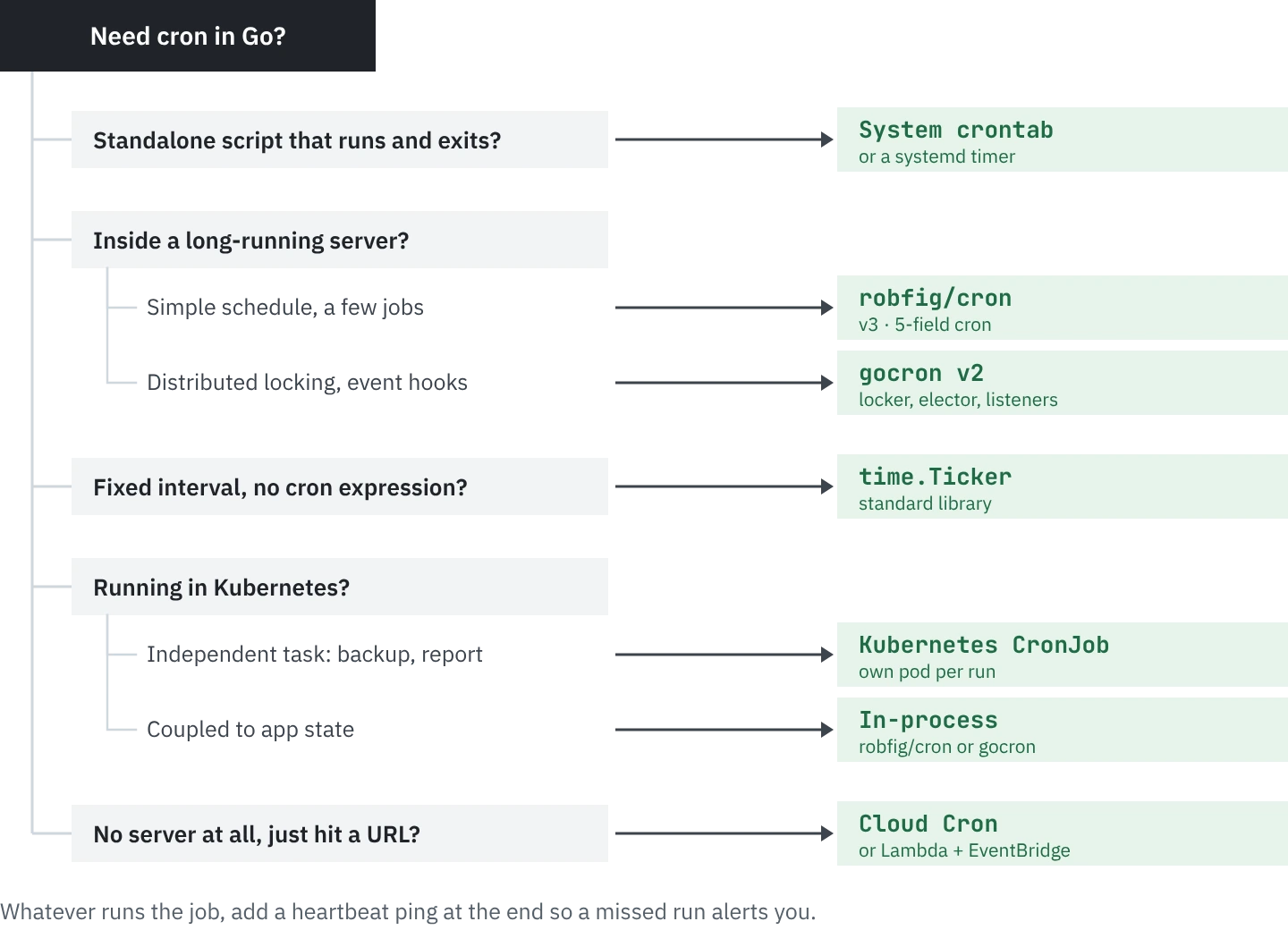
Scheduling inside a running server: robfig/cron for straightforward schedules, gocron when you need middleware, distributed locking, or job lifecycle hooks.
Simple fixed-interval tasks without calendar alignment: time.Ticker from the standard library. No dependencies, no cron expressions.
Kubernetes: CronJob resources for independent tasks, in-process scheduling for work that depends on application state.
Whatever you pick, add heartbeat monitoring. Scheduling is the solved problem. Knowing when something breaks before your users file a ticket is the unsolved one.
Testing cron schedules locally#
Nobody wants to wait until 3 AM to find out their job crashes. Both robfig/cron and gocron let you trigger jobs manually, but a more practical approach: extract the job logic into a standalone function, test it directly with go test, and treat the cron schedule as pure configuration. Separate what runs from when it runs.
// jobs/cleanup.go
func CleanupExpiredSessions(db *sql.DB) error {
    result, err := db.Exec("DELETE FROM sessions WHERE expires_at < NOW()")
    if err != nil {
        return fmt.Errorf("cleanup: %w", err)
    }
    rows, _ := result.RowsAffected()
    log.Printf("cleaned %d expired sessions", rows)
    return nil
}

// jobs/cleanup_test.go
func TestCleanupExpiredSessions(t *testing.T) {
    db := setupTestDB(t)
    insertExpiredSession(t, db, time.Now().Add(-24*time.Hour))
    insertActiveSession(t, db, time.Now().Add(1*time.Hour))

    err := CleanupExpiredSessions(db)
    if err != nil {
        t.Fatalf("unexpected error: %v", err)
    }
    // assert only the active session remains
}
For verifying that cron expressions parse correctly, robfig/cron's cron.ParseStandard("*/5 * * * *") returns a Schedule you can call .Next(time.Now()) on. Write a table-driven test with known inputs and expected next-run times. It's faster than deploying and waiting.
Frequently asked#
0 3 * * * /opt/app/bin/your-program. Unlike Python or Node.js, you don't need to specify an interpreter path — the compiled binary runs directly.cron.New(cron.WithSeconds()) and use six-field expressions where the first field is seconds. The default five-field mode starts at minutes.cron.WithLocation(loc) for robfig/cron or gocron.WithLocation(loc) for gocron. In Docker containers, add import _ "time/tzdata" to embed timezone data in the binary, or install the tzdata package in your Alpine image.