Scheduled webhook calls for SaaS products fail in a way that's easy to miss. Most reliability guides walk through retry policies, exponential backoff, dead-letter queues — all the machinery for when your endpoint returns 503. Good stuff. But there's a second failure mode nobody writes about: the scheduler stops firing entirely, and everyone assumes the job is running because nothing looks broken.
We caught that kind of failure because a user emailed asking why they hadn't received a trial expiry warning. The job hadn't fired in twelve days. A billing reconciliation on a different project had last run three weeks earlier; a token rotation broke the schedule, the queue stayed quiet, nobody noticed until the customer called. That's the category that actually costs you.
This guide covers how to set up scheduled webhooks for SaaS operations, design handlers that survive retries, and — this part matters most — know immediately when the schedule stops.
For a broader comparison of scheduling tools, the scheduled webhook services guide covers the landscape. For the Cloud Cron webhook scheduler feature itself, the product page has the full configuration reference.
What SaaS products actually use webhook cron jobs for#
Not all webhooks work the same way. Event-driven webhooks — the ones Stripe or GitHub POST to your URL when something happens — have delivery tracking, retry UIs, and clear failure logs built into the sender. Scheduled webhooks are the outbound side: your SaaS calling other endpoints, or calling your own endpoints, on a clock.
A few patterns that show up in almost every SaaS backend:
Subscription lifecycle triggers. A POST to /billing/check-renewals runs every hour, finds subscriptions due in 24 hours, and queues invoices and dunning sequences. If this cron stops firing, renewals go unprocessed until a customer notices their access is wrong — not from an alert on your side.
Trial expiry notifications. The 3-day, 1-day, day-of sequence needs a cron-scheduled webhook to your notification service, not just Stripe events. Stripe fires its own events, but the email orchestration logic lives in your app, and it needs a clock to trigger it.
Usage digest generation. Weekly summaries sent every Monday at 8 AM. A webhook fires to a report-assembly endpoint, queries the DB, generates the email, queues sends. If this stops, users stop getting reports, and you find out from a support ticket. Usually two weeks later.
State reconciliation. Stripe is your source of truth; your DB is a mirror. A nightly POST to /sync-subscriptions checks for drift — subscriptions whose Stripe status changed but whose webhook delivery failed. Without this job, stale access persists indefinitely.
Cleanup and expiration. Expire pending invitations after 48 hours, delete soft-deleted records after 30 days, purge temporary file uploads. Low-visibility work until a storage bill spikes or a user reports a ghost account.
Serverless relay. Vercel and Netlify functions have no built-in persistent cron. The standard workaround: an external service fires a POST to your function URL on a schedule. The function does the work; the scheduling is fully outsourced.
Most of these jobs succeed silently for months — which is exactly why a scheduling failure is so hard to detect without a monitor watching each one.
Setting up recurring webhook calls with Cloud Cron#
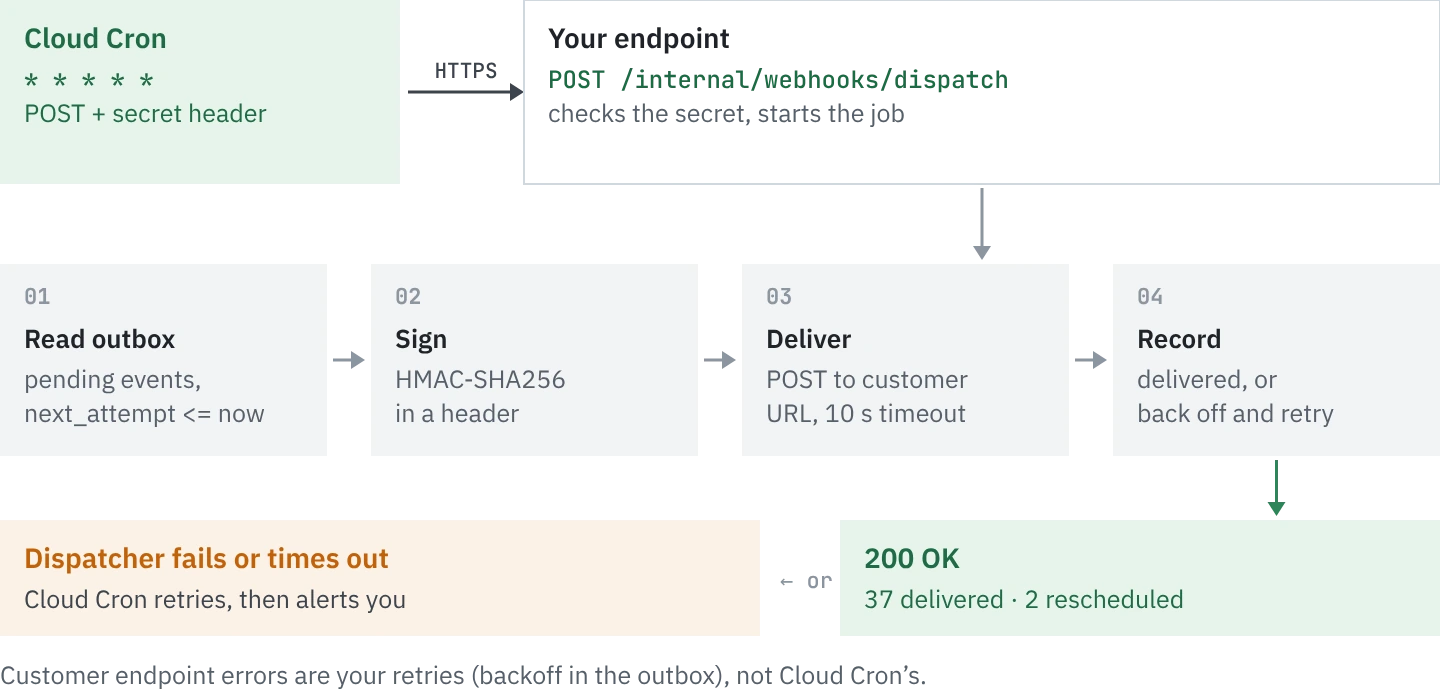
The setup is straightforward. Cloud Cron handles the scheduling layer: you define a URL, a cron expression, an optional payload, and the service fires the request on schedule and monitors whether it comes back.
Step 1: Create a Cloud Cron monitor. Point it at your endpoint — something like https://api.yourapp.com/billing/check-renewals. Select POST, set Content-Type to application/json, add your auth header. A Bearer token, HMAC signature, or a static secret in a custom header all work. If you don't have an auth layer on internal endpoints yet, add one before exposing them to external schedulers.
Step 2: Set the cron expression. 0 * * * * for hourly. 0 8 * * 1 for Monday at 8 AM. 0 2 * * * for 2 AM nightly reconciliation. The cron expression builder handles the translation if the syntax isn't familiar.
Step 3: Add a request body. Most internal webhook handlers accept a simple JSON payload identifying the job:
{
  "job": "billing-check",
  "run_at": "2026-11-19T02:00:00Z"
}
Your endpoint gets enough context to identify the specific run, log it, and handle it idempotently. That matters, which we'll get to in a moment.
Step 4: Configure your alert channel. When the endpoint fails to respond within the configured timeout, or returns a non-2xx status, WatchCron fires an alert to Slack, email, PagerDuty, or any of the other 19 available channels. After setup, every execution is logged: response code, response time, response body. Thirty runs at 200ms. Three timeouts during last week's deploy. That history is what tells you whether the schedule is healthy or quietly broken.
The key difference from a bare cron job: when the schedule fails, you find out in minutes rather than when a customer asks. The scheduled webhook services guide covers the broader landscape if you're weighing alternatives like cron-job.org, EasyCron, or cloud-native options.
Idempotency: design your handler to survive being called twice#
Any scheduler that retries on failure can call your endpoint more than once for the same scheduled run. Network hiccups, DNS delays, a momentary load spike on your server — the sender can't always tell whether its first request landed. If it doesn't get a 2xx within the timeout window, it retries.
If your handler isn't idempotent, that retry causes problems. Duplicate invoices, double-sent emails, state reconciliation running twice on partially-updated data. This isn't hypothetical — it's the first production incident most teams hit after moving to an external scheduler. The fix is a unique run identifier in every request and deduplication on the receiving end:
POST /billing/check-renewals
Content-Type: application/json

{
  "job":    "billing-check",
  "run_id": "billing-check:2026-11-19T02:00:00Z",
  "run_at": "2026-11-19T02:00:00Z"
}
The run_id combines the job name and the scheduled run time. Your handler checks a short-TTL store before processing:
if redis.get(f"processed:{run_id}"):
    return {"status": "duplicate", "skipped": True}

redis.setex(f"processed:{run_id}", 86400, "1")
# proceed with the actual job
If the scheduler retries the same run, the endpoint ignores it. If a new run comes in at the next scheduled time, it has a different timestamp and processes normally. A Redis key check and a one-day TTL. Without it, any retry mechanism is a source of duplicate side effects.
The idempotency glossary page covers the concept in more depth if you're implementing it across multiple job types. And if you're running billing-critical operations, the dead-letter queue pattern is worth reading alongside this — for jobs that failed after all retries and need to surface for manual review.
Common mistakes with scheduled webhook handlers
An endpoint can return 200 without completing the job. A query that returns empty results, a misconfigured flag, a background queue that's paused — all return 200. Check response body content, not just status code.\nNo idempotency key|Retries become duplicate actions. Billing reminders fire twice, reconciliations run on partial state, users get the same email at 2 AM and again at 2:03 AM.\nAuth token with no expiry check|A bearer token rotation breaks the schedule silently. When rotating credentials, update Cloud Cron config in the same deploy — not afterwards.\nTimeout shorter than job execution|A 30-second timeout fails on the 29th second of a heavy DB query. Set timeouts generously, or move the heavy work to a background queue — the webhook just triggers it, the queue does the actual processing.
Monitoring: two things worth checking separately#
Most setups watch only one of them. You need both.
Did the request fire? This is a heartbeat check on the scheduler itself — not on your endpoint. If the cron expression says 0 2 * * * and there's no execution logged at 2 AM, something failed upstream. Cron job monitoring catches this: if the monitor doesn't record an execution by the expected time, the alert fires, regardless of whether your endpoint is even reachable.
Did the response indicate real completion? A 200 status isn't the same as a completed job. If your billing check handler processes zero records because a query parameter changed, it returns 200 — but nothing ran. Structure your response to include job results:
{"processed": 42, "errors": 0, "run_id": "billing-check:2026-11-19T02:00:00Z"}Then configure a keyword check in your monitor. If "processed": 0 shows up in the response body on a Monday morning when you'd normally expect thousands, that's worth an alert — even though the HTTP status was 200.
For alert routing: billing-critical jobs should go to PagerDuty or wherever your team actually watches at odd hours. Cleanup jobs can route to Slack for next-business-day review. The API health checks guide covers response time thresholds in more detail if you're also watching third-party dependencies alongside your scheduled jobs.
When you shouldn't use a cron-based webhook scheduler#
Event-relative timing. If you need to fire a webhook 7 days after a user signs up — not on a clock, but relative to a user event — cron expressions don't map to that. You need delayed job infrastructure: Inngest, Trigger.dev, Temporal. Cloud Cron runs at fixed times; it doesn't track per-user timelines.
Complex multi-step workflows. If the job involves branching logic, human approval gates, or fan-out across dozens of services, a workflow engine handles it better than a single HTTP call. A webhook to one endpoint that orchestrates internally is fine; a DAG of dependent steps isn't the right fit.
Automation platforms for occasional, slow jobs. If something needs to fire once a day and latency doesn't matter, Zapier or Make works fine. Where they fall down: minimum 15-minute intervals on most plans, per-task pricing that adds up at high frequency, and no monitoring layer for your endpoint's actual failure modes.
For the common SaaS operations — billing reminders, cleanups, state reconciliation, weekly digests — a cron job to an HTTP endpoint with monitoring is exactly the right level of complexity. Fewer moving parts, fewer places to fail without anyone noticing. We've seen teams replace full Celery or Sidekiq setups with Cloud Cron for jobs that just needed to call a URL on a schedule.
The same infrastructure works across other problem domains too: automating backups, scheduled data sync, email campaign scheduling. Same monitoring layer, same alert channels, same execution history.
Frequently asked#
A webhook cron job is an HTTP request (usually POST) that fires automatically on a schedule defined by a cron expression. Instead of running a script locally, you configure an external scheduler to call your endpoint at set intervals — hourly, daily, weekly. The scheduler handles timing; your endpoint handles the actual work.
Use a hosted scheduling service like WatchCron Cloud Cron. You provide the endpoint URL, a cron expression, an optional JSON payload, and authentication headers. The service fires the request on schedule from its own infrastructure. No server, no crontab, no process to keep running.
Common use cases: subscription renewals and billing checks, trial expiry notifications, usage digest emails, database state reconciliation (syncing your DB against Stripe or another source of truth), data cleanup jobs (expiring invitations, purging soft-deleted records), and serverless function triggers on Vercel or Netlify.
WatchCron logs the failure — response code, response time, response body — and fires an alert to your configured channels (Slack, email, PagerDuty, etc.). The execution history shows you whether the endpoint returned a non-2xx status, timed out, or stopped receiving requests entirely. For critical jobs, you can configure a dead-letter review process for runs that fail after retries.
A regular cron job runs a shell command or script on the server where crontab is configured. A webhook cron job fires an HTTP request to any URL reachable over the internet. The difference matters for serverless environments (no persistent server), multi-service architectures (the trigger is decoupled from the work), and teams that want scheduling and monitoring in one place.
Yes, if the scheduler retries on failure. Include a unique run_id (combining job name + scheduled time) in every request body. On the receiving end, check a short-TTL cache before processing — if the run_id was already processed, return early. This prevents duplicate invoices, double-sent emails, and other side effects from retry behavior.